


Horizon Driving Simulator
4.2144.00 Reviews
App Specs
- Version
- 2.8.2
- Updated On
- License
- Free
- Downloads
- 1,000,000+
- Developer
- JM Game Studios
- Categories
- Racing
- Platform
- Android
Screenshots
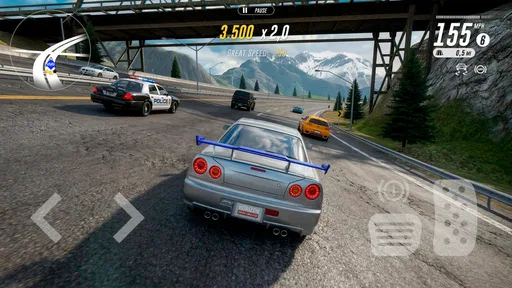
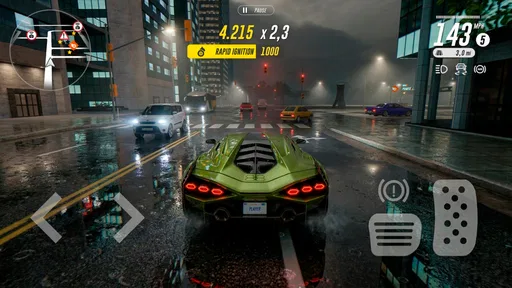
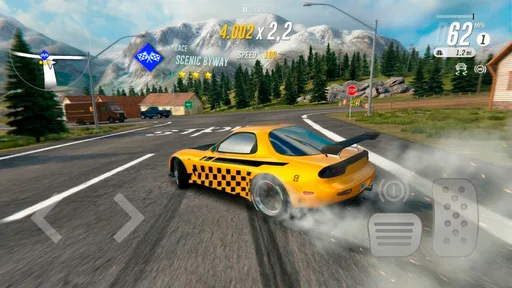
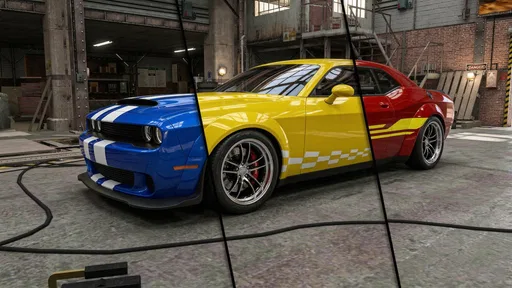

 Analysis by AppCompare
I approached Horizon Driving Simulator as a game to dip into when I wanted the feel of a drive without committing to a long session. That is where its open-world setup makes sense: I can pick a car, head out, and decide whether I want a focused challenge or a relaxed stretch of road. It is a free racing game from JM Game Studios, and the appeal is less about a single finish line than about shaping a car and enjoying the route.
Who will enjoy the open road
I think it suits players who like cars as much as they like racing. If you enjoy choosing a vehicle, making it feel more like your own, and then seeing how it behaves across different terrain, there is a satisfying loop here. The game’s emphasis on customization gives a drive a small personal goal, even when I am not chasing a race result. Its Everyone content rating also makes it a broadly approachable choice for families, though a parent should still decide whether the game’s spending options fit their household.
It is less compelling if your idea of a racing game is strict competition, precise track memorization, or a simulation built around detailed real-world driving procedure. Horizon Driving Simulator leans toward free-roaming variety and accessible play. Someone who wants a structured motorsport career or a highly technical cockpit experience may be happier with a more specialized alternative. I would also look elsewhere if I wanted a game whose main attraction is multiplayer competition rather than the drive itself.
Readable choices and a comfortable route in
On a phone, the first useful decision is choosing a control style that matches the way you play. The game offers tilt, touch, and steering-wheel controls, so I would test each briefly before settling in. Tilt can feel natural when I have room to hold the device steadily, while touch or a virtual wheel may be easier to manage if I prefer keeping my hands and phone position fixed. That choice matters more than chasing a supposedly perfect setup: a control method that feels comfortable is the one that makes a longer drive enjoyable.
I would treat the opening minutes as a low-pressure setup session. Try a short drive before taking on a demanding race, notice whether steering corrections feel predictable, and adjust your grip or control choice if they do not. This is a practical way to learn the handling differences the game presents between cars and terrain without turning an early mistake into frustration. If small on-screen controls are difficult for you to see or use, that is a meaningful limitation to consider before investing time in longer sessions.
Motor and sensory considerations
Driving games ask for repeated steering and quick reactions, and this one is no exception. Tilt input may be awkward for someone with limited wrist movement, while touch steering can require repeated finger movement. I would not assume that one option works equally well for everyone; trying the alternatives is the sensible first step. If you find yourself overcorrecting, slowing down and practising on a calmer stretch can be more useful than immediately switching to a faster car.
The changing scenery, weather, and day-night presentation add atmosphere, but they can also make the screen busier. For some players, the visual shifts are part of the pleasure; for others, they may make it harder to keep attention on the road. I would choose a relaxed drive rather than a race when I want to enjoy the landscape without also managing a competitive pace. Sound is another personal factor: the soundtrack contributes to the mood, but players who are sensitive to music or prefer quiet should consider how they like to play before settling in.
Worth Reading Before You Choose

EA SPORTS FC Mobile 26 Is a Bigger Football Game, but It Takes Time

Flipboard Shows What News Apps Must Do Beyond the Feed

Switching to Android Auto Means Rethinking Your Driving Routine

Google Calendar Makes a Crowded Week Easier to Manage

Ludo King Makes the Most of the Minutes Between Plans

Baby Panda World Brings Quick Play to Modern Phones, but Its Game Library Feels Busy
Making it fit everyday moments
A realistic use for me is a short break between other tasks: start a free-roam drive, enjoy a few turns, and stop when I am ready to return to the day. The open-world approach is a better fit for that kind of flexible session than a game that expects every visit to revolve around a full race. If I have more time, I can make customization the focus, then take the changed car out and see whether it suits the way I drive.
There is also a useful trade-off in how I approach progression. If I care about the scenery, I can prioritize an unhurried drive; if I want more structure, missions and races provide a clearer objective. Switching between those moods helps keep the game from feeling like one long test of speed. I would avoid starting a race when I only have a moment to spare, since a relaxed roam is easier to fit around interruptions than a competitive run.
Spending, expectations, and practical limits
The game is free to download, but it includes optional in-app purchases ranging from $1.99 to $84.99 per item. I would begin without spending and decide first whether the driving and customization hold my interest on their own. That is especially sensible for younger players: the Everyone age rating describes the content category, not whether purchases are suitable for a particular family. If a child uses the device, agreeing on purchase rules beforehand is a simple way to avoid an unwelcome surprise.
Horizon Driving Simulator has an average rating of 4.1 from around 9,200 ratings, and it has passed 1 million installs. Those figures suggest that it has found a sizeable audience, but they cannot tell me whether its controls will suit my hands or its presentation will suit my eyes. The current version is 2.4.8, and it requires Android 7.1 or later. I would check that requirement before downloading on an older device rather than assume a newer-looking game will run everywhere.
For an everyday comparison, I would put it between a track-focused racer and a pure driving sandbox. Compared with a conventional race-first game, the open-world freedom and vehicle customization give me more room to set my own pace. Compared with a very relaxed driving app, the missions and races offer clearer challenges when I want them. That balance is its most useful distinction, although players who want either strict competitive depth or a completely pressure-free experience may prefer a game designed specifically around that one goal.
Readability and navigation in practice
The best way to judge whether its presentation works for you is to try the menus and a brief drive on the device you plan to use. A display that is comfortable for one person may feel cramped to another, and a control layout that seems obvious in a calm moment can feel different once a race gets busy. I would check that I can identify the choices I need and steer without continually shifting my grip. This is not a game I would recommend choosing sight unseen if clear, large interface elements are essential for you.
For a more comfortable first session, I would use a stable seated position, keep the screen at a viewing distance that feels easy, and avoid playing while moving around. That is particularly helpful with tilt steering, where the phone itself becomes part of the control. If I play with touch input, a secure grip matters too; losing track of the screen because I am adjusting my hold is a needless source of frustration. These small setup choices do not change the game, but they can change whether the drive feels inviting or tiring.
Where the experience can fall short
The game offers several ways to play, but that does not mean every part of the experience will suit every player. Racing demands more attention than free roaming, and the same visual variety that makes a route feel lively can be distracting when I am trying to react quickly. I would not choose it as a low-stimulation option, or as a substitute for an accessibility-focused driving title, without first testing the screen and controls myself.
There is a second expectation to manage: the word “simulator” can suggest a very exacting approach to vehicle behaviour. Here, I would come for a mobile open-world drive with varied cars, customization, and optional competition, not for formal driver training or a comprehensive motorsport simulation. That distinction is important. If realism in the procedural sense is the priority, another category of game is likely a better match; if the goal is to enjoy driving around and making a car feel personal, this one is easier to recommend.
The Thrill of the Drive
Let’s talk about the driving experience first. The Horizon Driving Simulator offers a wide variety of cars to choose from, and each one feels unique. Whether you’re into speedy sports cars or rugged off-roaders, there’s something here for every car enthusiast. I personally loved the attention to detail; the cars handle differently depending on the terrain, which makes for a more realistic driving experience.
Graphics and Visuals
The graphics are absolutely stunning. The landscapes are beautifully rendered, with lush forests, sprawling cities, and sun-drenched deserts. It’s like taking a road trip without leaving your couch. The day-night cycle and dynamic weather effects add another layer of immersion. Driving through a rainstorm at night? Intense! Cruising under a sunset sky? Simply beautiful.
Gameplay and Features
The gameplay is surprisingly deep for a mobile simulator. There are various game modes to keep things fresh. You can choose to complete missions, participate in races, or just enjoy a leisurely drive in free roam mode. One of my favorite features is the customization option. You can tweak your car’s performance and appearance to suit your style. It’s a car lover’s paradise!
The controls are intuitive, and you have the option to choose between tilt, touch, or steering wheel controls. I found the tilt controls to be particularly engaging, providing a hands-on feel that’s perfect for a game like this.
Soundtrack and Audio
No road trip is complete without a killer soundtrack, right? The developers of Horizon Driving Simulator seem to agree. The game features a variety of tunes that match the vibe of the environment you’re exploring. Whether you’re driving through a bustling city or a serene country road, the music enhances the overall experience.
Community and Social Features
One of the coolest aspects is the online community. You can challenge friends or join a global leaderboard to test your skills against players worldwide. It adds a competitive edge that keeps you coming back for more. Plus, sharing your achievements with friends through social media integration is a nice touch.
Final Thoughts
Overall, Horizon Driving Simulator is a fantastic app for anyone who loves cars and driving. It combines realistic physics, breathtaking visuals, and engaging gameplay into one neat package. Whether you’re a casual player or a hardcore driving enthusiast, there’s something here for everyone. So buckle up and hit the road! You won’t regret it.
Pros
- Realistic driving physics enhance immersion.
- Wide variety of vehicles to choose from.
- Stunning graphics with detailed environments.
- Customizable controls for personal preference.
- Regular updates with new features and fixes.
Cons
- Occasional in-app purchase prompts.
- High battery consumption during gameplay.
- Requires a stable internet connection.
- Limited free content without purchases.
- Some bugs in traffic AI behavior.
FAQs for Horizon Driving Simulator
What is Horizon Driving Simulator?
Horizon Driving Simulator is a realistic driving simulation game available on both Android and iOS. It offers players an immersive experience with detailed graphics, diverse landscapes, and a variety of vehicles. Players can enjoy different driving modes, from casual cruising to challenging races, making it appealing to both casual gamers and driving enthusiasts.
Are there in-app purchases in Horizon Driving Simulator?
Yes, Horizon Driving Simulator includes in-app purchases. Players can buy various items such as new vehicles, upgrades, and customization options. While the game is free to download, these purchases can enhance your gameplay experience by unlocking additional features and content. However, all essential aspects of the game are accessible without spending money.
What are the system requirements for Horizon Driving Simulator?
Horizon Driving Simulator requires a device running Android 5.0 or higher, or iOS 11.0 or later. Ensure your device has sufficient storage space, as the game involves high-quality graphics and sound files. It is also recommended to have a stable internet connection to access online features and updates for an optimal gaming experience.
Can I play Horizon Driving Simulator offline?
Yes, Horizon Driving Simulator offers offline gameplay, allowing you to enjoy the driving experience without an internet connection. However, some features, such as multiplayer modes and certain updates, require an online connection. Playing offline may limit access to these aspects, but you can still enjoy the core driving experience.
How does Horizon Driving Simulator ensure realistic driving physics?
Horizon Driving Simulator uses advanced physics engines to deliver realistic driving experiences. Each vehicle is designed with precise handling characteristics, reflecting real-world dynamics. The game also simulates different driving conditions, such as weather changes and terrain variations, to further enhance the realism and challenge of the gameplay.


